





Model Context Protocol (MCP) is an open standard that enables AI assistants to securely connect to your application’s data, tools, and business logic in real time.
Instead of treating AI as a standalone chatbot, MCP allows it to act as an intelligent interface on top of your systems – capable of querying data, invoking tools, and returning context-aware insights.
Why MCP Matters ?
Traditional AI integrations rely on:
- Static prompts
- Pre-processed data
- Limited context
MCP changes this by enabling AI models to:
- Access live data securely
- Understand business-specific context
- Perform real-time analysis
- Return structured, explainable results
In short, MCP turns AI into an active participant in your application, not just a text generator.
How MCP Works
MCP introduces a standardized way for AI models to:
- Discover what tools and data are available
- Request data or actions in a structured format
- Receive contextual responses from your system
Your application remains in full control of:
- What data is exposed
- Which actions are allowed
- How permissions are enforced
The Laravel MCP Package: Powering the Integration
To enable seamless communication between the LLM and the platform, we implemented a custom Laravel-based MCP package tailored specifically for secure, real-time analytics in multi-tenant SaaS environments.
This package acts as the core translation layer between the AI model and the platform’s business data.
What the Laravel MCP Package Does
The Laravel MCP package is responsible for:
- Exposing MCP-compatible endpoints
- Mapping natural language intent to data queries
- Context-aware data access
- Multi-tenant data isolation
- Permission and scope enforcement
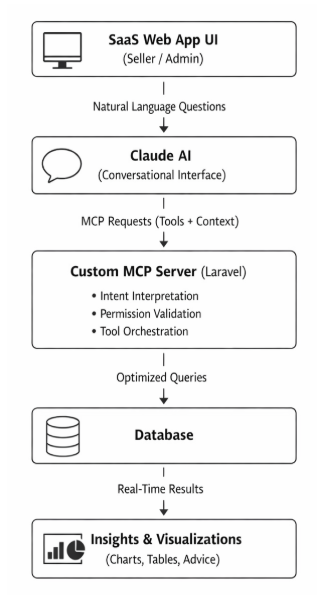
MCP Integration Architecture (High-Level Flow)
1. Create an MCP Server Layer in Laravel
Start by building a dedicated MCP server layer within your Laravel application. This layer is responsible for handling all MCP-related requests from the AI model.
Key responsibilities:
- Implement MCP-compatible endpoints
- Handle tool discovery requests
- Process AI-generated tool calls
This can be structured as:
- A dedicated controller (e.g., McpController)
- A service layer for MCP logic
- Separate classes for each MCP tool
2. Define MCP Tools as Laravel Services
Each MCP “tool” represents a specific capability exposed to the AI.
Example: Fetch campaign performance in an advertising analytics project.
In Laravel:
- Implement tools as service classes
- Keep business logic isolated from controllers
- Return structured JSON responses
This ensures tools are reusable, testable, and scalable.
3. Map Natural Language Intent to Business Logic
When the AI calls an MCP tool:
- Laravel receives a structured request
- The MCP layer validates parameters
- Business rules are applied
- Optimized database queries are executed
This step is where domain intelligence lives – metrics, date logic, thresholds, and performance calculations.
4. Enforce Security and Permissions
Security is critical in MCP integrations. Laravel makes this straightforward using:
- Middleware for authentication
- Policies and gates for authorization
- Tenant-aware data filtering
- Scope-based access control
Every MCP request should be validated against:
- User roles
- Account access
- Data visibility rules
5. Return Context-Rich Responses
Responses sent back to the AI should be:
- Structured
- Meaningful
- Context-aware
Laravel formats the response with:
- Data results
- Aggregations or summaries
- Metadata for visualization (charts, tables)
The AI then converts this into:
- Natural language explanations
- Visual insights
- Actionable recommendations
Conclusion
MCP enables a shift from dashboard-driven analytics to conversational intelligence.
With Laravel as the foundation, you can build secure, scalable MCP servers that allow users to simply ask questions – and get answers instantly.